How to Manage Your Jobs List as an FY1
A repeatable way to run your FY1 jobs list: a template to copy, triage after the round, chase results in batches, and hand over cleanly.

How should an FY1 manage the jobs list?
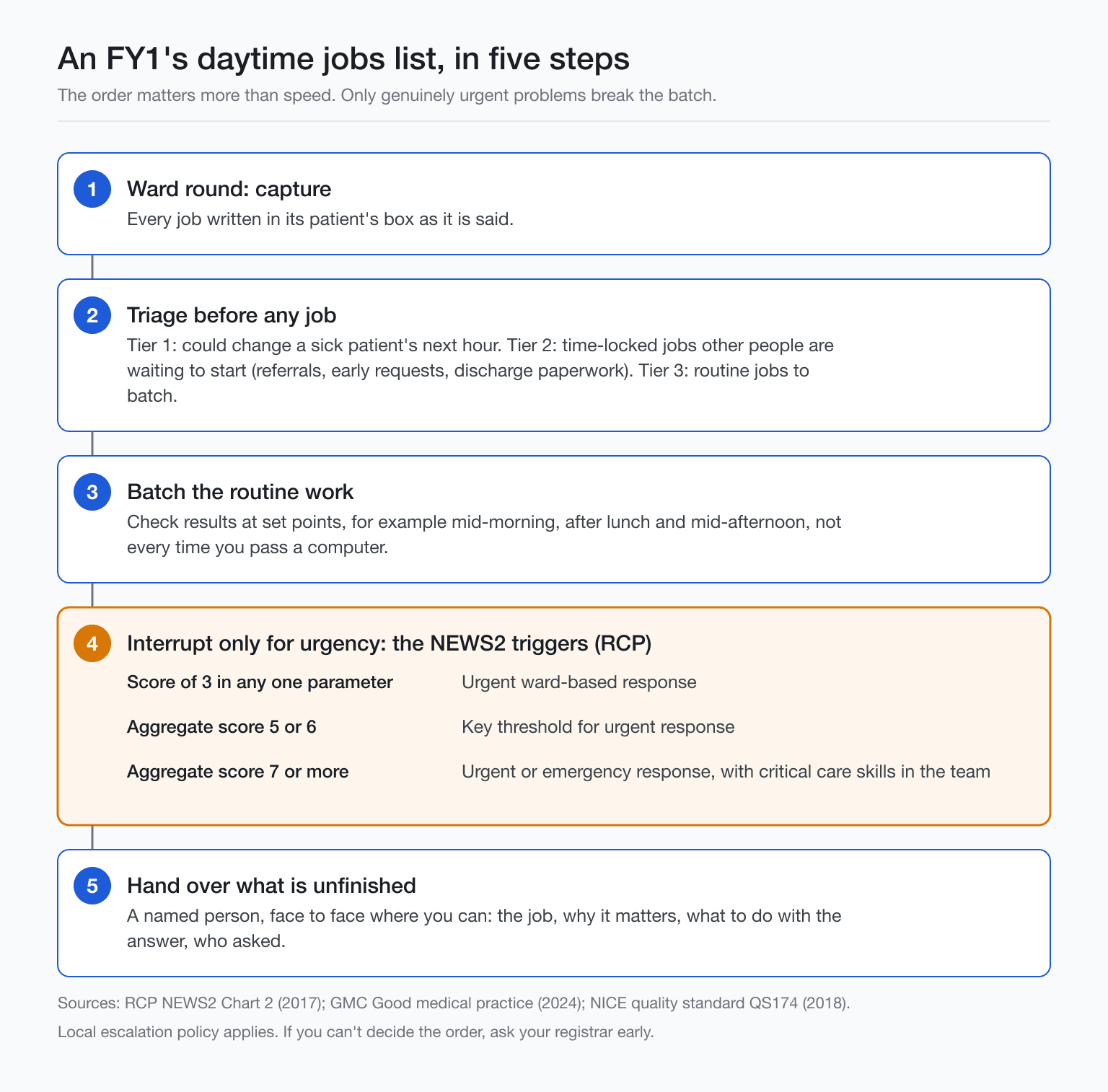
To manage your jobs list as an FY1, write every job under its patient during the ward round, triage straight after by clinical urgency, batch routine work and results chasing, let only real urgencies interrupt, and hand over anything unfinished in a structured way before you leave.
For wider habits and headspace, read the FY1 survival guide.
The round ends and you’re left with a page of scribbles, the consultant has walked off, your bleep’s going, and you can feel something important sliding off the edge. You need a system you can run under noise.
This is mostly process, not brains. If you’ve been wondering how to manage your jobs list as an FY1, treat it like a production line you control.
- Capture: write every job against a named patient during the round, in their words if needed, no memory tax.
- Triage: sort by clinical urgency and deadlines straight after the round.
- Batch: group calls, forms, consults and results chasing to cut context switching.
- Interrupt: predefine what’s allowed to break your batch work, and what waits.
- Hand over: pass on unclosed tasks in a structured way before you go off duty.
Writing jobs during the ward round: the box format
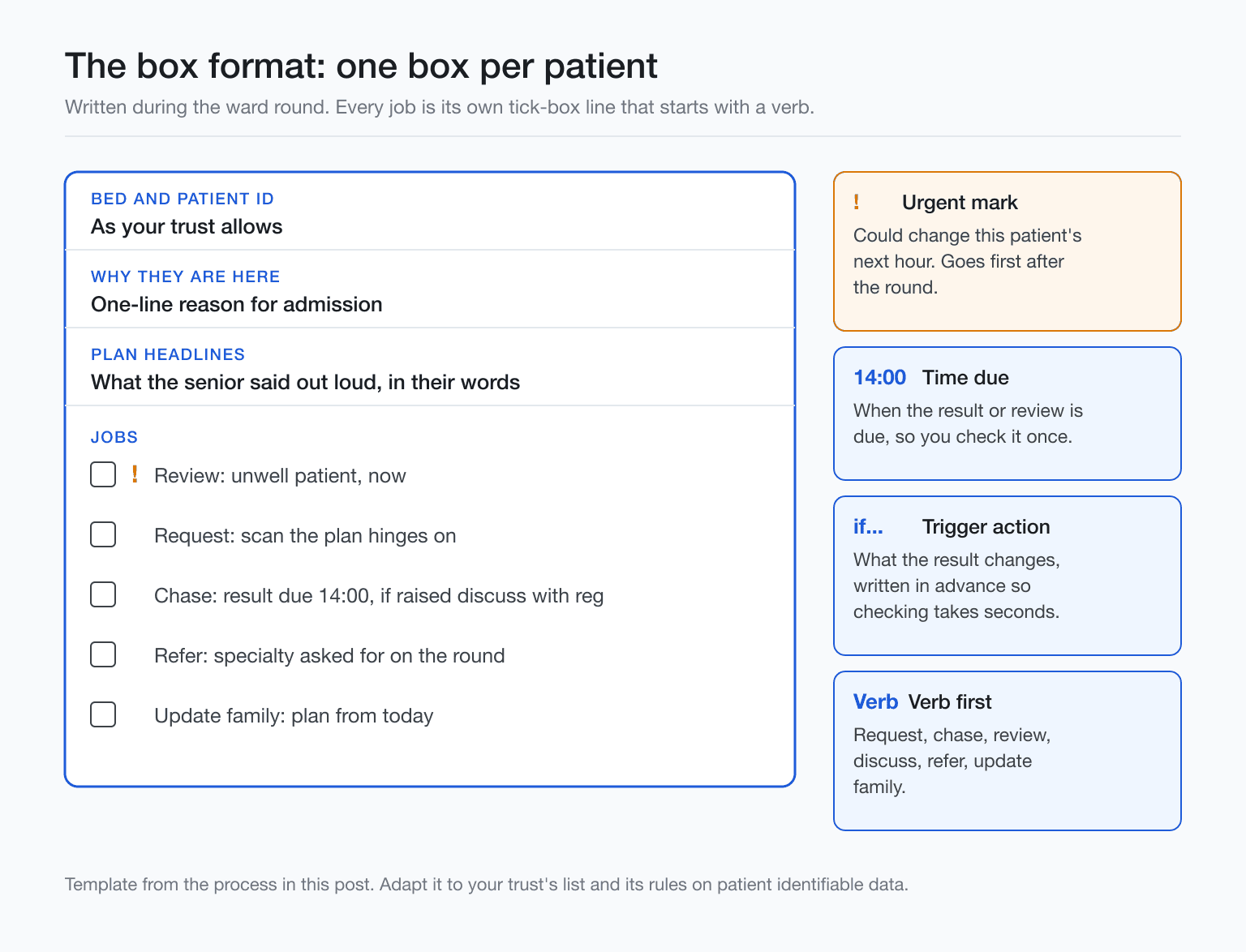
The box format for an FY1 jobs list means one box per patient, written as you go on the ward round. It turns a stream of instructions into clear, tickable actions, and it helps you triage. Each box holds identifiers, the one-line why-they-are-here, the plan headlines, and every job as a verb-led line. Clean boxes double as handover fodder and tomorrow’s mini script. Simple, visible, quick.
- Bed and patient identifier, as your trust allows.
- One-line reason for admission.
- Plan headlines the senior said out loud.
- Tick-box jobs, each starting with a verb for example request, chase, review, discuss, refer, update family. Mark urgent jobs, and write the time a result is due.
Write each job in the exact words you’ll act on, not shorthand you’ll need to decode later.
Before the team moves, ask the senior to repeat any plan you didn’t catch, then write it. Note who asked for it.
Keep patient identifiable lists secure and dispose of them per local policy. A clean box also helps with presenting cleanly on rounds the next day.
What goes first after the ward round?
Triage after the ward round is where you pause, scan patients, and decide the order before touching a keyboard. Spend a few minutes sorting the ward jobs list. Speed helps, but order prevents rework and protects patients and time. Do this first.
- Anything that could change a sick patient's next hour, an unwell review, an urgent scan, or a result the plan hinges on.
- Time-locked jobs so others can start, early requests to other departments, referrals, or discharge paperwork that frees a bed.
- Routine jobs to batch, like phlebotomy forms, non-urgent imaging, notes updates, or chasing results that won’t change care today.
Urgency is about the patient, not who asked loudest.
Link urgency to NEWS2. Per the Royal College of Physicians chart, a score of 3 in any single parameter needs an urgent ward-based response, 5 to 6 is the key threshold for an urgent response, and 7 or more needs an urgent or emergency response with critical care skills in the team. See the NEWS2 trigger chart. Local escalation policies apply. If you can't decide the order, ask your registrar early with a short "here's my order, does that look right?" message.
Practise triage calls Practise triage judgement away from the ward with Diagnosica's two-minute quick case. Patient line, five clues, guess after each, keeps a daily streak, fits your commute, free to start, no card needed. Try quick case
How do you chase results without losing the afternoon?
Chasing results is about batching, not grazing. Check at set points rather than every time you pass a computer, and decide in advance what each result will change. If you plan the when and the so what on your ward jobs list, you cut the drip of micro-tasks and protect time for things only you can do.
Next to each request, write an expected result time window in the box, even if it’s a guess. Then batch checks into two or three rounds, for example mid-morning, after lunch, and mid-afternoon.
Pre-write the trigger action for each result so checking takes seconds. Examples: 'if raised, discuss with reg', 'if normal, move to discharge paperwork', 'if down-trending, recheck tomorrow'.
Tell the nurse in charge which results you’re waiting on so they know what you’ll act on today. Cross off visibly and timestamp, so the next person can see what’s closed.
Your trust’s EPR and messaging tools can help. See apps junior doctors rely on. Systems differ across trusts.
The job that jumps the queue: a nurse bleep mid-list
A nurse bleep mid-list is the classic test of how to manage your jobs list as an FY1 in the day. Some bleeps should stop the list entirely, and the skill is spotting which ones while you are mid way through routine jobs. This section stays on daytime workflow, with a link out for handling bleeps in general.
Here is a worked example from a fictional AI patient case. Wayne Tolhurst, 46, a labourer, is two days into an admission after falling down the stairs at home three days earlier. The nurse bleeps that he is shaking, drenched in sweat with his gown and sheets changed twice since midnight, and seeing insects on the bedclothes. "I can't stop shaking and I'm soaked through. What day is it? Why am I here?"
Obs on the board are heart rate 124, respiratory rate 24, blood pressure 172/98, temperature 37.9 C. He gives the wrong day, with brief clear spells. New confusion alone scores 3 on NEWS2 per the Royal College of Physicians, which is a red flag for urgency even before you add anything else.
The history that matters lands fast. Nobody asked about alcohol at clerking, he drinks ten to twelve cans of strong lager a day, his last drink was about 60 hours ago, and a brief shaking episode with a bitten tongue about 40 hours after that was written as a faint. The case answer is delirium tremens from alcohol withdrawal, with distractors like sepsis, subdural haematoma, hypoglycaemia and Wernicke's encephalopathy.
Process point. This jumps to the top of your list, you review now and escalate to your senior, and you note on the list which job you dropped so it does not vanish.
Diagnosica is an AI clinical simulator for medical students and junior doctors: you take a history from an AI patient by voice or text, order labs and imaging, commit to a diagnosis and management plan, and get a competency scorecard. Wayne is one of its cases, the patient appears as a video avatar, it is free to start with no card needed, it runs on iPhone, Android and the web, and learners use it in the UK, Canada, Australia, Ireland and the US. It is not a substitute for your trust’s escalation policy.
Handing over unfinished jobs at 5pm
Handing over unfinished jobs at 5pm means anything not done by the end of the day is passed to a named person, face to face where you can, with exactly what it is, why it matters, and what to do with the answer. No vague tasks. Clear triggers, expected results, and who will act.
The GMC's Good medical practice says you must be confident that information necessary for ongoing care has been shared before you go off duty, and should check where practical that a named clinician or team has taken over. NICE's structured handover standard, QS174 published 7 September 2018, uses SBAR and lists eight items, ending with tasks still to do, and expects verbal plus written or electronic handover. The RCP handover toolkit calls a standardised written proforma essential, ideally paired with face to face verbal handover.
- Patient: full name, bed, responsible team.
- Job: the exact task to do.
- Why it matters: the clinical question or risk.
- Act on: result or trigger, and what to do with the answer.
- Who asked: the consultant or specialty owning it.
For nights, see the night-shift version.
Common questions
Should an FY1 keep the jobs list on paper or electronically?
Use whatever your trust provides and allows, and keep it in the same place. Paper lists contain patient identifiable information, so follow local policy on carrying and disposal. Many wards use electronic lists. NICE describes structured handover as verbal and written or electronic. Consistency wins.
What counts as an urgent job on the ward?
An urgent job is anything that could change a patient’s next hour. NEWS2 guides you: single-parameter score of 3 needs urgent response, aggregate 5 to 6 triggers urgent response, and 7 or more is urgent or emergency, per the RCP's NEWS2 page. New confusion scores 3.
What if I can't finish my jobs before I go home?
Hand over to a named colleague with a structured note and what to do with pending results. GMC Good medical practice expects you to share necessary information before you go off duty, and to check someone has taken over. Ask for help at 15.00, not 18.45.
How do I get faster at prioritising the list?
Speed comes from reps in the reasoning behind triage, not rushing clicks. Sort before you start, then ask your registrar to check your order early. Rehearse spotting the sick patient with cases. Diagnosica’s two-minute quick case drip feeds five clues and keeps a streak, a nudge.
Practice reps Practise the reasoning behind your jobs list with an AI patient case or a two-minute quick case on iPhone, Android or web, free to start, no card needed. Open Diagnosica